What is Max for Live in Ableton and what is it for?
Max for Live extends Ableton with devices that can generate sound, process audio, or transform MIDI. It is not a sample pack or other VST format. You don't need to program to get started: you can use existing devices and learn what they do within a track.
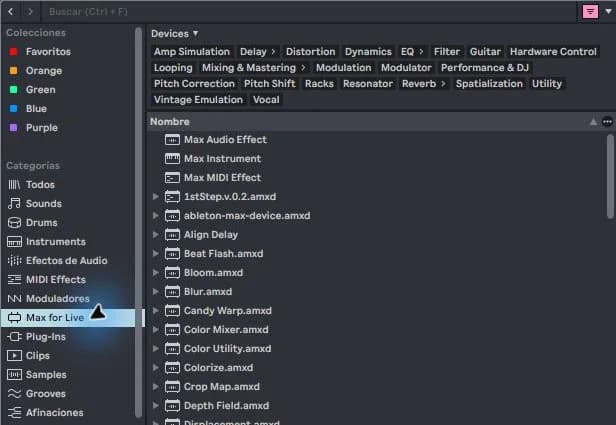
step by step
- Search for Max for Live in the Ableton browser. Distinguishes instruments, MIDI effects and audio effects.
- Choose a simple device and read its requirements. Availability depends on your license and the version of Live and Max that device requires.
- Place an instrument on a MIDI track, a MIDI effect before the instrument, or an audio effect after the sound source.
- Save a copy of the project and check that the device reloads when you open it.
Guided practice
Draw a sharp note and load a compatible instrument you already have available. Change a single control and see the response. Then write what you changed: tone, rhythm, timbre or volume. That classification helps more than accumulating devices without knowing them.
Take it to your next session
If you're still learning how to organize samples and projects, start small. Review the Technopirata Starter Packs and their requirements; Max for Live can be added later when it solves a specific need.
When is it worth adding Max for Live
Think of a specific need: slowly modulate a filter, transform notes, or generate a timbre. Find a device that solves that task and learn its main controls before adding others. Having more tools does not make the signal path clearer.
To start, use a single instance in a test project. Save one version without it and another with the result. This comparison allows you to decide if it adds anything to the arrangement. Before relying on a device in a collaboration, confirm that the other person has the necessary environment and license.
If it doesn't turn out as you expected
Just because Max comes bundled into one installation does not mean that all editions have the necessary license to use any device. Check your edition before purchasing a device or a project that depends on it.
PUT THE WORKFLOW TO USE
See Starter Packs
If you're still learning how to organize samples and projects, start small. Review the Technopirata Starter Packs and their requirements; Max for Live can be added later when it solves a specific need.QUICK ANSWERS
Frequently asked questions
KEEP BUILDING
Related production guides
How to Install Max for Live AMXD Devices in Ableton
An AMXD file contains a Max for Live device. Installing it does not consist of copying it to the VST folder. It is advisable to save it in a stable way, along with any additional files provided by its creator, so that your Ableton projects can find it later.
How to activate and check Max for Live in Ableton
In current versions of Ableton, Max comes built into the installation. Before looking for another installer, check your license and which Max app Live is using. Installing a standalone copy does not convert an edition without the proper license to an edition with Max for Live.
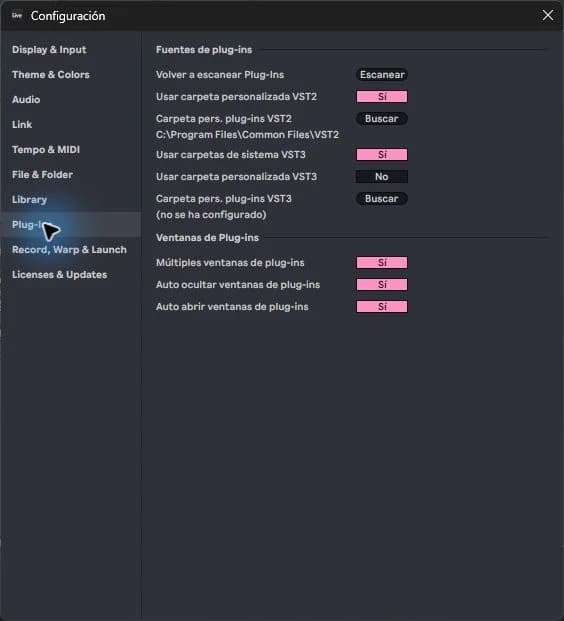
How to Open a VST on an Ableton MIDI or Audio Track
An instrument converts MIDI notes into sound; An effect transforms sound that already exists. That difference explains why dragging a plugin onto any track doesn't always produce the expected result. In Ableton you can check the signal path from left to right in the device chain.