How to Install Max for Live AMXD Devices in Ableton
An AMXD file contains a Max for Live device. Installing it does not consist of copying it to the VST folder. It is advisable to save it in a stable way, along with any additional files provided by its creator, so that your Ableton projects can find it later.
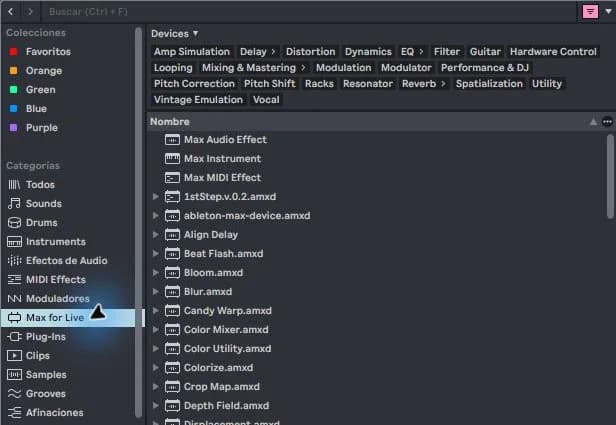
step by step
- Download the device from its creator and check the license, minimum version and dependencies. Unzip the entire package if it comes in ZIP.
- Save the device folder to a stable location in your work library. Keep the included instructions and resources.
- Add that folder to the Live browser or locate the AMXD from the browser. Drag it to a compatible track.
- Test its controls with a simple signal. Save a copy of the Set, close it and open it again to check references.
Guided practice
Use a single device in a test session. Write down its name and version in a project note. If you are going to share it, check what its license allows: having permission to use it does not mean you can redistribute the file.
Take it to your next session
When you choose a Technopirata project, check its dependencies. A project is most useful for learning when you can open its instruments and compare their decisions with your own samples.
Also keep the files that accompany the device
Some AMXD devices arrive inside a folder with instructions, presets or additional resources. Read what the creator needs before moving just the main file. A device can open its interface and still not find a resource that it uses to generate sound.
Organize a folder dedicated to devices and separate their versions with recognizable names. Test the update on a copy of the Set before replacing a tool that already works. When sharing the project, respect the device license: including a project does not automatically grant permission to redistribute all of its plugins.
If it doesn't turn out as you expected
Do not change any extension to AMXD. If the device depends on other files, moving only the AMXD can break it. Check the original package before concluding that Ableton doesn't work.
PUT THE WORKFLOW TO USE
View Ableton projects
When you choose a Technopirata project, check its dependencies. A project is most useful for learning when you can open its instruments and compare their decisions with your own samples.QUICK ANSWERS
Frequently asked questions
KEEP BUILDING
Related production guides
Max for Live Instruments in Ableton: How to Load Them
Max for Live instruments are played via MIDI, like other Ableton instruments. Not all Max devices generate sound: some only modify notes or process audio. Identifying the correct type avoids loading an effect and expecting it to play on its own.
How to activate and check Max for Live in Ableton
In current versions of Ableton, Max comes built into the installation. Before looking for another installer, check your license and which Max app Live is using. Installing a standalone copy does not convert an edition without the proper license to an edition with Max for Live.
What is Max for Live in Ableton and what is it for?
Max for Live extends Ableton with devices that can generate sound, process audio, or transform MIDI. It is not a sample pack or other VST format. You don't need to program to get started: you can use existing devices and learn what they do within a track.