VST2, VST3 and AU in Ableton: what format does your project need
VST2, VST3 and AU are plugin formats; They are not sample types or quality levels. An Ableton project stores references to the devices it uses, and the format is part of that reference. This is why two installations of the same synthesizer can behave as different devices when opening a Set.
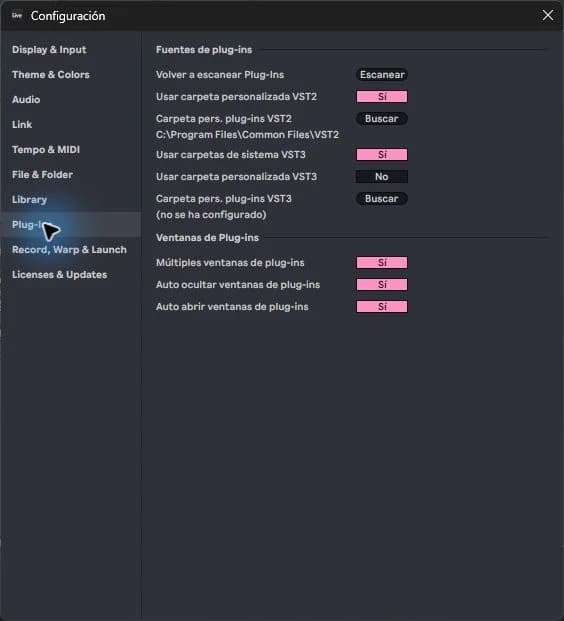
step by step
- Check the project requirements before installing anything. Find the exact name of the plugin and the requested format.
- On Windows, it works with supported VST formats; AU belongs to macOS. Don't expect an AU file to work when porting a project to Windows.
- Install the format that the project needs. For new projects, choose a format that is available and compatible on the computers where you are going to open it.
- If you collaborate, agree on Live version, plugin version and format. Add an audio render when someone else does not have the instrument.
Guided practice
Prepare a copy of a project with an instrument track and an exported audio track of that same part. Name the second “Audio Reference.” This way you will have a useful comparison if the instrument is missing from another computer.
Take it to your next session
In the project catalog, treat compatibility as part of the purchase. If you're looking to get started without installing additional instruments, check that your specific project uses the devices included in your Ableton edition.
Prepare a collaboration without surprises
Imagine you send an Ableton project to someone who uses another operating system. Even if you both have the same synthesizer, a different format may prevent you from recovering the track. Includes a note with the name, version, and format, plus an exported audio reference.
The audio file allows you to hear the musical intention, but it does not replace the possibility of editing notes or presets. Keep both materials if you need to continue the work later. Before purchasing a template, decide if you want to study an editable chain or simply work with its audio elements.
If it doesn't turn out as you expected
Do not rename extensions to convert formats. Also, do not replace a device and save over the only original: its presets, automations or parameters may not migrate as you expect.
PUT THE WORKFLOW TO USE
View Ableton projects
In the project catalog, treat compatibility as part of the purchase. If you're looking to get started without installing additional instruments, check that your specific project uses the devices included in your Ableton edition.QUICK ANSWERS
Frequently asked questions
KEEP BUILDING
Related production guides
How to Open a VST on an Ableton MIDI or Audio Track
An instrument converts MIDI notes into sound; An effect transforms sound that already exists. That difference explains why dragging a plugin onto any track doesn't always produce the expected result. In Ableton you can check the signal path from left to right in the device chain.
Ableton doesn't recognize my VSTs - how to check folders and scan
If Ableton doesn't recognize your VSTs, reinstalling them all at once often makes diagnosis difficult. Check a known plugin and resolve the problem with that plugin before repeating the process. The goal is not for just any file to appear, but for Live to detect the compatible formats you really need.
How to install a VST in Ableton Live
Installing a VST in Ableton Live has two parts: installing the plugin and allowing Live to find its compatible format. A standalone application that you open from the desktop does not guarantee that its VST version has also been installed. Start with just one instrument and see if it works before adding more.