Sidechain in Ableton: How to make the kick control the bass
The sidechain allows one signal to control a processor placed on another track. In Ableton, a common use is to briefly reduce the bass when the kick hits. The goal may be clarity or a creative pump; It is best to decide before adjusting.
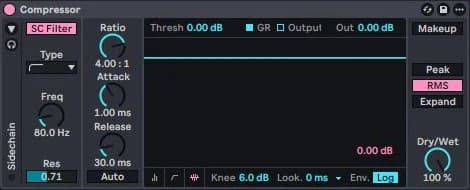
step by step
- Insert Compressor into the bass track and open its sidechain section.
- Activate the external input and choose the kick track as the source. Check the available outlet point.
- Lower the threshold until you see reduction when the kick hits. Adjust the intensity moderately.
- Modify attack and recovery by listening to the complete pattern. The recovery should allow the bass to return when you need it.
Guided practice
Use a sustained bass and a regular kick. First look for a barely noticeable reduction; then briefly exaggerate to recognize the effect. Go back to a musical setting and compare with the uncompressed version.
Take it to your next session
Open a Technopirata project and see how the rhythm coordinates before playing its settings. The same chain may need other values when changing samples or tempo.
Adjust recovery to pace, not a fixed number
Watch the bass return after each kick. If you take too long, the next blow may come before you regain presence; if you return too quickly, the movement can be nervous. Use the actual pattern of the theme to decide the character you are looking for.
First compare a gentle reduction and a noticeable one. This way you can choose if you need discreet space or a main pump. Also check the signal that triggers the effect: selecting the wrong source can produce seemingly irregular behavior, even if the compressor controls are set reasonably.
If it doesn't turn out as you expected
If there is no reduction, check external input, source track, level and threshold. If the bass disappears for too long, check recovery and intensity. The sidechain is no substitute for choosing a compatible kick and bass.
PUT THE WORKFLOW TO USE
View Ableton projects
Open a Technopirata project and see how the rhythm coordinates before playing its settings. The same chain may need other values when changing samples or tempo.QUICK ANSWERS
Frequently asked questions
KEEP BUILDING
Related production guides
How to adjust attack and release of a compressor in Ableton
Attack and release influence how a compressor responds over time. To learn them in Ableton, use simple percussion and listen to the beginning of each beat and its recovery. You don't need a complex mixing chain to recognize those differences.

How to record vocals in Ableton to a mono track
To record a vocal with a microphone connected to a single input, you typically need a mono input on Ableton. Mistakenly selecting a stereo pair can leave voice on only one side. Set up the signal first and then think about effects.
How to Space Between Kick and Bass in Ableton
When kick and bass are covered in Ableton, the first setting doesn't have to be an EQ. The length of the notes, the tail of the sample, and the timing of each hit determine how much they overlap.