How to Space Between Kick and Bass in Ableton
When kick and bass are covered in Ableton, the first setting doesn't have to be an EQ. The length of the notes, the tail of the sample, and the timing of each hit determine how much they overlap.
step by step
- Listen to kick and bass without the rest of the mix and then include it again to confirm the problem.
- Try a shorter kick tail or shorter bass notes on a copy of the pattern.
- Compare another octave or a different bass source if they are both competing for the same role.
- Only then try equalization or dynamic reduction and compare at a similar level.
Guided practice
Create two eight-bar versions. In the first it preserves the tails; In the second, shorten them slightly. Listen to see whether useful gaps appear between hits and whether the bass maintains its rhythmic intent.
Take it to your next session
Ableton projects allow you to study these decisions together. Choose a compatible example and look at the relationship between pattern, samples, and envelopes before copying an effects chain.
Decide what role each element of the bass plays
Listen to the kick and bass together first, without the rest of the arrangement. Identify when they coincide and how long each one lasts. If both hold energy for the entire measure, you may need to shorten an envelope or change the pattern before resorting to more processing.
Then listen to the entire mix again. A perfect solo separation can leave the track without weight when the other tracks come in. Work with small changes and maintain a previous reference. Choosing compatible samples can save more time than trying to fit two constantly competing sounds together.
If it doesn't turn out as you expected
Do not cut bass from both tracks until you leave the mix without foundation. Decide which element supports the lowest area. Nor is a change of polarity a universal solution: check several notes of the bass.
PUT THE WORKFLOW TO USE
View Ableton projects
Ableton projects allow you to study these decisions together. Choose a compatible example and look at the relationship between pattern, samples, and envelopes before copying an effects chain.QUICK ANSWERS
Frequently asked questions
KEEP BUILDING
Related production guides
How to adjust attack and release of a compressor in Ableton
Attack and release influence how a compressor responds over time. To learn them in Ableton, use simple percussion and listen to the beginning of each beat and its recovery. You don't need a complex mixing chain to recognize those differences.
Sidechain in Ableton: How to make the kick control the bass
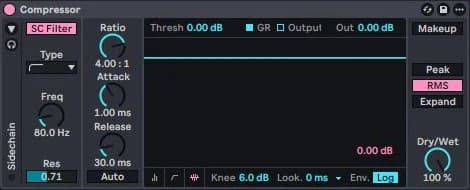
The sidechain allows one signal to control a processor placed on another track. In Ableton, a common use is to briefly reduce the bass when the kick hits. The goal may be clarity or a creative pump; It is best to decide before adjusting.
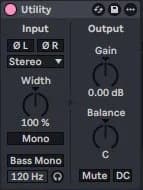
Utility in Ableton: Volume, Pan and Stereo Width
Utility brings together simple controls that are useful in many Ableton projects. It can help you compare levels, check mono and adjust width. Using it well starts with knowing which control you are changing and why.