How to adjust attack and release of a compressor in Ableton
Attack and release influence how a compressor responds over time. To learn them in Ableton, use simple percussion and listen to the beginning of each beat and its recovery. You don't need a complex mixing chain to recognize those differences.
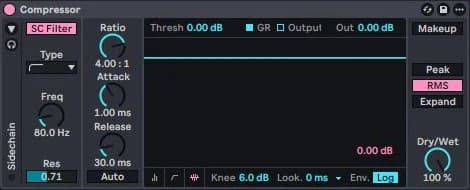
step by step
- Choose a repetitive pattern and prepare a sufficiently perceptible compression to study its behavior.
- Change the attack while keeping the other controls stable and listen to what happens at the beginning of the hit.
- Then adjust the release and see how the sound recovers between hits.
- Reduce the intensity of the effect if it was exaggerated and compare it with the original signal to a similar level.
An exercise for your project
Use a loop with strong hits and softer details. Try a short recovery and a longer recovery, listening to several bars with the kick. Note which one maintains the movement you're looking for, rather than memorizing a value that might not work for another pattern.
Take it to your next session
Practice these decisions within a project whose pace you can understand. In the Ableton catalog, review the required devices and choose an example that you can open and modify.
What should you listen to?
A useful decision begins by describing the problem: overly aggressive attacks, uneven notes, or a rhythmic feeling that needs control. If the sound already fulfills its function, you don't have to compress it. Learn the relationship between material and effect before applying settings out of habit.
If it doesn't turn out as you expected
If too much attack disappears or the loop doesn't seem to regain energy, reduce processing and return to a simple comparison. If the result only seems better by turning up the output, compensate for the volume. Keep a raw copy to separate a character change from a true fix of the problem.
Ableton Reference
PUT THE WORKFLOW TO USE
View Ableton projects
Practice these decisions within a project whose pace you can understand. In the Ableton catalog, review the required devices and choose an example that you can open and modify.QUICK ANSWERS
Frequently asked questions
KEEP BUILDING
Related production guides

How to create a reference track to mix in Ableton
A reference helps you remember the balance you're looking for while mixing an Ableton project. It's not about copying all your sounds or chasing your final volume. Choose a file that you can legitimately use and that has comparable musical function to your theme.
How to Compare Effects at the Same Volume in Ableton
A stronger effect may seem better even though it isn't solving anything. Comparing at a similar volume in Ableton helps you decide if a processor brings clarity, movement or character to your samples and projects, rather than being left out by a difference in level.
How to Space Between Kick and Bass in Ableton
When kick and bass are covered in Ableton, the first setting doesn't have to be an EQ. The length of the notes, the tail of the sample, and the timing of each hit determine how much they overlap.