Utility in Ableton: Volume, Pan and Stereo Width
Utility brings together simple controls that are useful in many Ableton projects. It can help you compare levels, check mono and adjust width. Using it well starts with knowing which control you are changing and why.
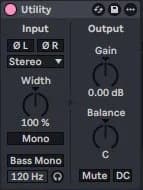
step by step
- Insert Utility into a test track and locate Gain, Width, Mono and Bass Mono.
- Move Gain to adjust the level without changing other controls yet.
- Compare the signal with Mono on and off. Then it returns to the original state.
- Try Width with small changes. Note that Balance shifts the balance between channels and is not equivalent to converting the signal to mono.
Guided practice
Make a comparison at equal volume between two versions of a track. Use Gain to prevent the loudest from appearing better just by level. Then check if a width reduction clarifies the arrangement.
Take it to your next session
You can practice these checks on a small Starter Pack base. Start with a few sounds and learn to balance them before adding more tracks to your Ableton project.
Separates volume compensation from stereo effect
Use Utility with a specific intent and change one control at a time. If you compare width, keep a similar level before and after so you don't simply prefer the strongest option. If you need to automate volume, identify where the device is within the chain.
Placing it before or after other effects can change what those processors receive. For example, lowering the signal before a level-dependent effect is not always equivalent to lowering the final result. Keep instance names clear when using multiple instances for different functions within the same project.
If it doesn't turn out as you expected
Utility does not replace a decision about what samples or notes the track needs. If two parts occupy the same register and rhythm, consider changing the arrangement before looking for a width solution.
PUT THE WORKFLOW TO USE
See Starter Packs
You can practice these checks on a small Starter Pack base. Start with a few sounds and learn to balance them before adding more tracks to your Ableton project.QUICK ANSWERS
Frequently asked questions
KEEP BUILDING
Related production guides
How to Space Between Kick and Bass in Ableton
When kick and bass are covered in Ableton, the first setting doesn't have to be an EQ. The length of the notes, the tail of the sample, and the timing of each hit determine how much they overlap.
What sounds to leave in stereo in Ableton
Stereo can provide space for pads, ambiences, percussion or effects in Ableton. The important thing is that this amplitude fulfills a function and does not hide the center of the mix. A wide sample is not automatically better than a mono sample.
Bass in mono in Ableton: when is it appropriate and how to check it
The bass doesn't have to be completely mono in all Ableton projects. The usual thing is to look for a stable bass foundation and decide separately what to do with its harmonics and effects. Utility allows you to compare both decisions.