What sounds to leave in stereo in Ableton
Stereo can provide space for pads, ambiences, percussion or effects in Ableton. The important thing is that this amplitude fulfills a function and does not hide the center of the mix. A wide sample is not automatically better than a mono sample.
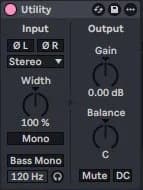
step by step
- Choose an element that can occupy the sides without competing with the foundation.
- Listen to it in context and check if its bass muddies the center.
- Compare the original width with a narrower version. Change little by little and compensate for level differences when necessary.
- Check the mix in mono and keep only the amplitude that contributes something useful.
Guided practice
Place a texture behind a kick and bass pattern. Reduce its width until it stops attracting too much attention and then recover a small part. Look for a position that accompanies the pattern.
Take it to your next session
Sample libraries offer textures with different spatial characters. Choose by music feature and compare demos within your Ableton projects before deciding.
Breadth needs a recognizable center
An open texture stands out more if it coexists with stable elements in the center. Before widening another track, listen to see if there is enough lateral information already. Adding width to all the layers can make them harder to distinguish instead of creating a larger blend.
Try reducing the width of a secondary part while maintaining the wide effect in the main section. That contrast can help the arrangement without adding sounds. Check the mono version and the balance between sides; A striking result with headphones also deserves a listen on other available systems.
If it doesn't turn out as you expected
Duplicating an identical track and panning each copy to the side does not by itself create a useful stereo difference. Delaying one side can produce width, but also cancellations; check the monkey sum.
PUT THE WORKFLOW TO USE
Explore sample libraries
Sample libraries offer textures with different spatial characters. Choose by music feature and compare demos within your Ableton projects before deciding.QUICK ANSWERS
Frequently asked questions
KEEP BUILDING
Related production guides
Utility in Ableton: Volume, Pan and Stereo Width
Utility brings together simple controls that are useful in many Ableton projects. It can help you compare levels, check mono and adjust width. Using it well starts with knowing which control you are changing and why.
What sounds to put in mono in your Ableton projects
Mono is a function and compatibility decision, not a rigid list of instruments. In Ableton you can check kick, sub-bass and lead vocals as starting points, but each recording and arrangement needs its own check.
Bass in mono in Ableton: when is it appropriate and how to check it
The bass doesn't have to be completely mono in all Ableton projects. The usual thing is to look for a stable bass foundation and decide separately what to do with its harmonics and effects. Utility allows you to compare both decisions.