How to Use Auto Filter to Darken Samples in Ableton
Filtering a sample allows you to change the space it occupies without replacing it with another file. In Ableton, an opening or closing filter can help separate sections and make room for a voice or melody. Start with a simple, audible movement.
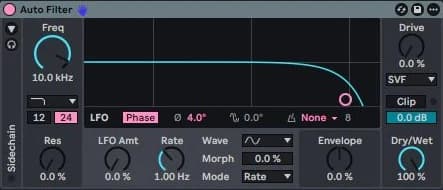
step by step
- Place Auto Filter on the sample track and hear the sound unchanged.
- Select an appropriate filter behavior to reduce brightness and slowly move the frequency.
- Keep the resonance moderate while you learn what part of the sound you are removing.
- Compare the result within the mix and automate the move only when you find a useful range.
An exercise for your project
Use a texture that accompanies an eight-bar phrase. Make it start darker and open up towards the end. Listen to see if the change guides the section without competing with the main element. If it only increases the sensation of volume, reduce the travel and compare again.
Take it to your next session
A good texture provides material for practicing filters and transitions. Explore sample libraries and choose sounds that fit your project even before adding processing.
What should you listen to?
Before moving controls, write down what you need: less brightness, a gradual transition, or a more distant sound. This intention avoids turning each filter into a leading effect. A suitable sample may need a small correction; It is not mandatory to radically transform the material to justify the device.
If it doesn't turn out as you expected
If peaks or an overly pronounced tone appear, reduce the resonance and check the level. If the sample disappears, perhaps you have closed more than its content allows. Keep a version without effect to recognize whether the adjustment improves the sound's function or simply makes it different.
Ableton Reference
PUT THE WORKFLOW TO USE
Explore sample libraries
A good texture provides material for practicing filters and transitions. Explore sample libraries and choose sounds that fit your project even before adding processing.QUICK ANSWERS
Frequently asked questions
KEEP BUILDING
Related production guides
How to Compare Effects at the Same Volume in Ableton
A stronger effect may seem better even though it isn't solving anything. Comparing at a similar volume in Ableton helps you decide if a processor brings clarity, movement or character to your samples and projects, rather than being left out by a difference in level.

How to create rests and stops in Ableton projects
A silence can mark a transition more clearly than another effect. In Ableton you can practice removing elements during a short part of the arrangement and listening to how it changes the arrival of the next section. Space is also part of the rhythm.
How to automate a filter in Ableton step by step
Automating a filter in Ableton means saving how its control changes over time. Automation must have a function: introduce a section, clear a space, or create a recognizable transition.