How to save versions of your projects in Ableton
Saving versions allows you to test important decisions without depending on remembering how the project was. In Ableton it is useful before changing the arrangement, replacing instruments or preparing a delivery. The naming system can be simple, as long as you can understand it afterwards.
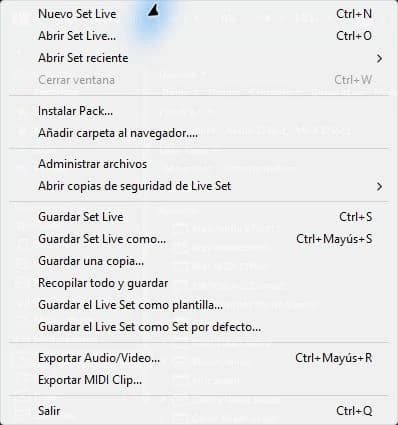
step by step
- Preserve an identifiable version before a breaking change.
- Use ordered names that describe the stage of the work, such as idea, arrangement, and mix.
- Add a brief note if a version resolves a specific decision or contains an alternative.
- Keep a separate backup of the project and the files it needs to open.
An exercise for your project
Save one version with the original bass and another with an alternative sound. Export short references with related names and listen to them later. This way you can decide from a distance without rebuilding the previous instrument or trusting that the latest version will always be the best.
Take it to your next session
Organize your versions also when working with catalog projects. Keep the original, open a study copy and record what own decisions you incorporate.
What should you listen to?
Multiple copies within the same disk help compare decisions, but do not equal protection against the loss of that disk. Distinguish creative history and support. You also don't need to duplicate every minute: reserve clear versions for changes that are actually worth recovering.
If it doesn't turn out as you expected
If everything ends up called final, add revision numbers or descriptions. If you don't know which file to continue, review your notes before modifying another one. Preserves the resources of important versions: an old Set loses its usefulness if it no longer finds the samples it used.
Ableton Reference
PUT THE WORKFLOW TO USE
View Ableton projects
Organize your versions also when working with catalog projects. Keep the original, open a study copy and record what own decisions you incorporate.QUICK ANSWERS
Frequently asked questions
KEEP BUILDING
Related production guides
How to prepare a 30-minute sample session in Ableton
A short session works best when you have a limited task. In Ableton you can spend half an hour turning a few samples into a playable idea, without trying to finish mixing, arranging, and final export at the same time. Constraint helps you decide what deserves your attention.
How to prepare an Ableton project for collaboration
Sharing an Ableton project requires more than just sending a Set file. The other person needs to understand what it contains, what dependencies it uses, and what you expect it to do. Preparing this delivery reduces searches for samples and avoids confusion between versions of the same work.
How to add your samples folder to the Ableton browser
Adding a samples folder to Ableton's browser creates convenient access to your files; it doesn't make that folder part of every project. Use a stable location and preserve the original organization of the library to avoid broken references.