How to prepare an Ableton project for collaboration
Sharing an Ableton project requires more than just sending a Set file. The other person needs to understand what it contains, what dependencies it uses, and what you expect it to do. Preparing this delivery reduces searches for samples and avoids confusion between versions of the same work.
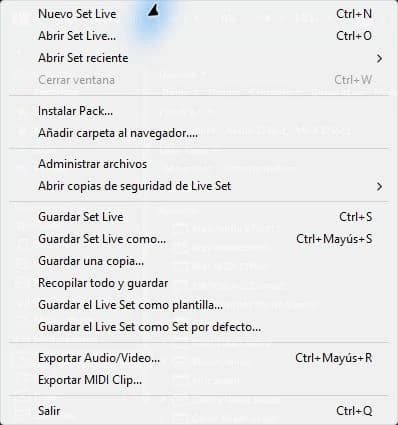
step by step
- Save a delivery copy with a name that includes project and version.
- Gather the necessary files using the project management options and keep your original library intact.
- Note Live version, external plugins and relevant material requirements.
- Includes a reference mix and a brief note on pending work.
An exercise for your project
Imagine someone else is going to edit the bass. Identifies your track, preserves editable MIDI where appropriate, and adds an audio reference showing the intended result. Explain what needs to change and what parts are already agreed upon, without forcing her to interpret the entire session.
Take it to your next session
Before purchasing a project to study or collaborate on, check format, version, and dependencies. Choosing a compatible resource avoids spending the first session solving requirements that you were unaware of.
What should you listen to?
An organized folder is not a substitute for licenses. Check which resources you can share and which each collaborator must obtain on their own. If a dependency is not available on the other computer, agree on an audio alternative or replacement, always keeping your original editable version.
If it doesn't turn out as you expected
If you receive missing file warnings, distinguish samples from plugins and locate the specific dependency. If multiple ambiguous versions appear, agree on which version is current before continuing editing. A clear message about the delivery objective usually saves more time than sending all portfolios.
Ableton Reference
PUT THE WORKFLOW TO USE
View Ableton projects
Before purchasing a project to study or collaborate on, check format, version, and dependencies. Choosing a compatible resource avoids spending the first session solving requirements that you were unaware of.QUICK ANSWERS
Frequently asked questions
KEEP BUILDING
Related production guides
How to save versions of your projects in Ableton
Saving versions allows you to test important decisions without depending on remembering how the project was. In Ableton it is useful before changing the arrangement, replacing instruments or preparing a delivery. The naming system can be simple, as long as you can understand it afterwards.

How to reduce tracks to finish an Ableton project sooner
When an Ableton project accumulates too many tracks, each decision can become slower. Temporarily reducing the arrangement helps recognize what supports the idea and what only adds work. You don't need to delete valuable material to take this test: keep a complete version of the Set.
How to add your samples folder to the Ableton browser
Adding a samples folder to Ableton's browser creates convenient access to your files; it doesn't make that folder part of every project. Use a stable location and preserve the original organization of the library to avoid broken references.