How to prepare a 30-minute sample session in Ableton
A short session works best when you have a limited task. In Ableton you can spend half an hour turning a few samples into a playable idea, without trying to finish mixing, arranging, and final export at the same time. Constraint helps you decide what deserves your attention.
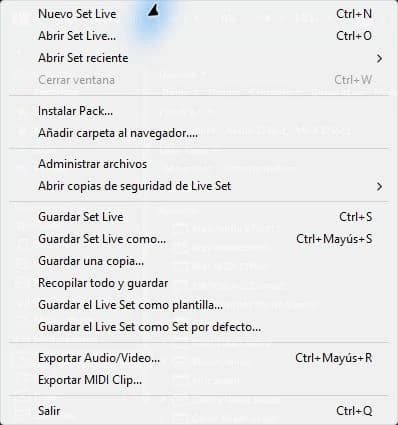
step by step
- Define a small goal: a loop with rhythm and bass, a transition or a selection of compatible sounds.
- Prepare a few samples and a simple project before starting to explore alternatives.
- Work on the pattern and basic balance first; Leave the details that don't affect the idea for later.
- Save the Set and a note with the next step before logging out.
An exercise for your project
Dedicate the beginning to choosing a kick, a hat and a percussion. Build a short phrase, add a variation and listen to several repetitions. When you're done, write down whether the idea needs a melody or a structure. The session already has value even if it is not yet a complete track.
Take it to your next session
A Starter Pack can make this session easier if it includes the type of material you need. Review its content and come up with a concrete exercise to turn those resources into a saved idea.
What should you listen to?
The time limit is an organizational tool, not a promise of identical results each day. If you encounter an installation or file problem, separate it from the creative goal and resolve it into another task when possible. Avoid consuming the entire session by changing tools.
If it doesn't turn out as you expected
If you spend more time searching than composing, narrow down your sample selection. If you're constantly jumping between goals, write down just one pending decision and finish that one. A Starter Pack or a well-known library can facilitate preparation, as long as its content corresponds to the work you want to practice.
Ableton Reference
PUT THE WORKFLOW TO USE
See Starter Packs
A Starter Pack can make this session easier if it includes the type of material you need. Review its content and come up with a concrete exercise to turn those resources into a saved idea.QUICK ANSWERS
Frequently asked questions
KEEP BUILDING
Related production guides

How to choose between Ableton samples and projects to learn
A sample library and an Ableton project teach different things. Samples offer material to build your own decisions; A project allows you to study how tracks, clips and devices are related within a session. Choose according to the difficulty you want to solve now.
How to save versions of your projects in Ableton
Saving versions allows you to test important decisions without depending on remembering how the project was. In Ableton it is useful before changing the arrangement, replacing instruments or preparing a delivery. The naming system can be simple, as long as you can understand it afterwards.
How to add your samples folder to the Ableton browser
Adding a samples folder to Ableton's browser creates convenient access to your files; it doesn't make that folder part of every project. Use a stable location and preserve the original organization of the library to avoid broken references.