How to make space for a melody between your samples in Ableton
A melody can be lost because there are too many elements playing at the same time. Before adding more effects in Ableton, review the arrangement of your samples. Removing, shortening, or alternating a layer is often a direct way to get a main idea across.

step by step
- Listen to the section where the melody comes in and recognize which track should attract your attention.
- Temporarily mute secondary layers one by one to locate which ones compete with it.
- Try removing some beats or reducing the length of a loop instead of deleting the entire track.
- Compare the reduced arrangement with the original and keep only the changes that clarify the sentence.
An exercise for your project
Prepare eight bars with melody, kick, bass and two percussions. Make a percussion respond in the gaps of the melody and leave its main moments free. Listen if the conversation between parties is clearer without raising the main instrument.
Take it to your next session
Choose samples that leave space for the main idea of your song. Explore a library with a defined objective and compare a few options within the melody you are already working on.
What should you listen to?
The space does not depend solely on the frequency range. The time of entry, duration, registration and amount of information also intervene. Start with the decision that you can understand most easily; a complicated mix may be trying to compensate for an arrangement that still needs to be simplified.
If it doesn't turn out as you expected
If removing layers leaves the section empty, recover a single layer and review its pattern. If the melody still doesn't work when you clear it, listen to its register and its relationship to the bass. Don't use more volume as an automatic response to any prominence problem.
Ableton Reference
PUT THE WORKFLOW TO USE
Explore sample libraries
Choose samples that leave space for the main idea of your song. Explore a library with a defined objective and compare a few options within the melody you are already working on.QUICK ANSWERS
Frequently asked questions
KEEP BUILDING
Related production guides
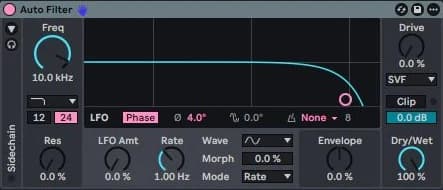
How to build a transition with noise samples in Ableton
A noise sample can anticipate a section if it accompanies an already understandable transition. In Ableton you can practice with a single texture and simple volume or filter movements. The intention is to direct the energy to one point, not to fill every gap in the arrangement.
How to create a reference track to mix in Ableton
A reference helps you remember the balance you're looking for while mixing an Ableton project. It's not about copying all your sounds or chasing your final volume. Choose a file that you can legitimately use and that has comparable musical function to your theme.
How to import multiple samples to separate tracks in Ableton
When importing multiple samples into Ableton, first decide whether you want a sequence on a single track or simultaneous sounds on different tracks. That decision changes what you can edit and mix later.