How to import multiple samples to separate tracks in Ableton
When importing multiple samples into Ableton, first decide whether you want a sequence on a single track or simultaneous sounds on different tracks. That decision changes what you can edit and mix later.
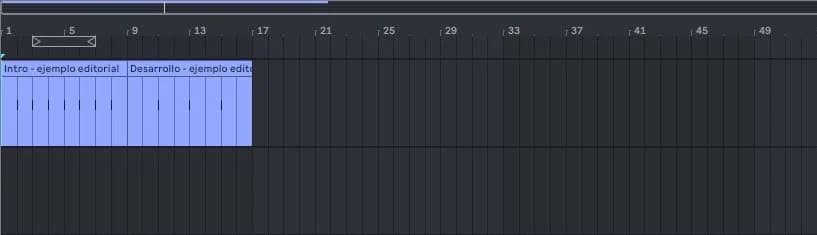
step by step
- Open Arrangement and locate a small group of audio files in the browser.
- Select the files you want to import. Start dragging and hold Ctrl on Windows or Cmd on Mac to spread them onto separate tracks.
- Before releasing, look at the destination preview. Check that they appear stacked as you expect.
- Play each track separately and rename it according to its function. Adjusts the common start if it is stems.
Guided practice
Import three drum samples to different tracks. Mute two and confirm which plays each track. Then listen to all three together and lower their levels before deciding which parts to keep.
Take it to your next session
An organized library makes these first tests easier. Choose a small set of Technopirata samples and create a manageable foundation before filling the project with dozens of tracks.
Check the result before sorting the tracks
After importing several files, confirm that each sample is in the track and position you expected. A set of files can represent simultaneous layers or a sequence; that intention changes how it is convenient to place them. Do the first test with few elements to recognize the behavior.
Rename tracks by their musical function and not just the file name. Kick, percussion and texture are understood faster when returning to the Set. If you receive stems from someone else, respect their common starting point: moving each file to its first sound can break the alignment of the set.
If it doesn't turn out as you expected
Don't confuse standalone samples with stems exported from the same project. Stems usually need a common start, while a one-shot can be placed freely. If the drag does not produce the expected distribution, cancel it before releasing.
PUT THE WORKFLOW TO USE
Explore sample libraries
An organized library makes these first tests easier. Choose a small set of Technopirata samples and create a manageable foundation before filling the project with dozens of tracks.QUICK ANSWERS
Frequently asked questions
KEEP BUILDING
Related production guides

How to change samples in Ableton without rewriting the pattern
Changing a sample without rewriting the beat is easier when the pattern is in MIDI and the sound lives in Simpler or a Drum Rack pad. The MIDI preserves the triggers and you compare different sound sources in Ableton.
How to listen to samples at the tempo of your project in Ableton
Listening to an isolated sample and listening to it within a project are different tests. A loop can look cool on its own and compete with the kick when you put it into Ableton. Use pre-listening to filter options and an audio track to make the final decision.
How to use Simpler to play a sample in Ableton
Simpler turns a sample into an Ableton instrument. MIDI notes control when it is triggered and, depending on the mode, its pitch and duration. It's a convenient way to play a sample without duplicating many audio clips.