How to build a transition with noise samples in Ableton
A noise sample can anticipate a section if it accompanies an already understandable transition. In Ableton you can practice with a single texture and simple volume or filter movements. The intention is to direct the energy to one point, not to fill every gap in the arrangement.
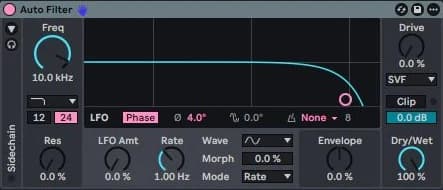
step by step
- Choose an authorized sample and place it before an important entry in the project.
- Adjust its length so that the transition ends where you want, listening to its relationship to the rhythm.
- Draw a simple growth in volume or filter opening, avoiding unnecessary jumps.
- Listen for the arrival of the next section and adjust the tail so it doesn't hide its first hit.
An exercise for your project
Create a four-measure transition into a part with more instruments. Compare the arrangement without noise and with a moderate amount. If you need too much effect to recognize the change, first check what comes out and what goes into the musical structure.
Take it to your next session
Look for textures and transition effects that you can adapt to the course of your project. Review the contents of each library and start with a single sample to learn how to control its function.
What should you listen to?
The end of the transition is as important as the growth. A continuous texture can detract from the strength of the element it was intended to announce. Decide whether you want a cut, a short tail, or a smooth continuity and keep enough contrast so that the new section has its own space.
If it doesn't turn out as you expected
If the noise covers the drums, reduce their level and presence before adding more processors. If it sounds disconnected, adjust when it starts and ends within the phrase. Try a short version and a long version; The best duration depends on the arrangement, not a fixed number.
Ableton Reference
PUT THE WORKFLOW TO USE
Explore sample libraries
Look for textures and transition effects that you can adapt to the course of your project. Review the contents of each library and start with a single sample to learn how to control its function.QUICK ANSWERS
Frequently asked questions
KEEP BUILDING
Related production guides

How to work with long loops without getting lost in Ableton
A long loop can contain several ideas, intensity changes, and useful rests. In Ableton it is best to listen to it in its entirety before converting it into a short repeat. This way you can choose the fragments that really accompany your project and preserve the variations that give it personality.
How to make space for a melody between your samples in Ableton
A melody can be lost because there are too many elements playing at the same time. Before adding more effects in Ableton, review the arrangement of your samples. Removing, shortening, or alternating a layer is often a direct way to get a main idea across.
How to automate a filter in Ableton step by step
Automating a filter in Ableton means saving how its control changes over time. Automation must have a function: introduce a section, clear a space, or create a recognizable transition.