How to group and order tracks in a project in Ableton
Grouping tracks in Ableton helps you control sets of sounds and read your project. You can bring together percussion, bass, or vocals, but it's worth distinguishing between visual organization and shared processing.

step by step
- Select multiple related tracks and use Group Tracks. On Windows you can use Ctrl+G; on Mac, Cmd+G, with tracks selected.
- Rename the group according to its function. Check that its content matches the name.
- Fold and unfold the group to navigate the project. Assign colors with simple logic.
- Listen to the group and its tracks separately before adding effects to the bus.
Guided practice
Organize six tracks into three small groups: drums, tonal elements, and vocals or textures. Lower the volume of a group and confirm which sounds it controls. This exercise avoids mistakes when automating later.
Take it to your next session
A Technopirata project can help you study an orderly session. Look for relationships between names, groups and samples; then adapt that logic to your own Ableton projects.
Group by what you need to control together
A group is useful when your tracks share a musical function or you need to treat them as a set. Percussion, bass layers, and vocals are possible examples; It is not necessary to group each track. Keep names clear to recognize what each block includes without constantly displaying it.
Before processing a group, listen to what clues reach it and check their combined level. If a single element dominates, correct it on its own track. An effect on the group transforms the entire group and can hide the cause of an imbalance that would be easier to resolve individually.
If it doesn't turn out as you expected
If the shortcut groups devices instead of tracks, the focus was on the chain. Undo and select the correct headers. A group also does not replace the need to adjust the balance of your internal tracks.
PUT THE WORKFLOW TO USE
View Ableton projects
A Technopirata project can help you study an orderly session. Look for relationships between names, groups and samples; then adapt that logic to your own Ableton projects.QUICK ANSWERS
Frequently asked questions
KEEP BUILDING
Related production guides
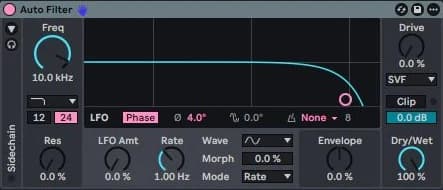
How to automate a filter in Ableton step by step
Automating a filter in Ableton means saving how its control changes over time. Automation must have a function: introduce a section, clear a space, or create a recognizable transition.
How to mark intro, break and drop in an Ableton project
Locators help you read the structure of an Ableton project. Tags like Intro, Break, and Drop allow you to quickly return to a section, but the name doesn't create the musical change: it must correspond to something that's actually happening.
How to import multiple samples to separate tracks in Ableton
When importing multiple samples into Ableton, first decide whether you want a sequence on a single track or simultaneous sounds on different tracks. That decision changes what you can edit and mix later.