How to export your Ableton project to WAV
Exporting an Ableton project to WAV creates an audio file of a chosen region and output. Before exporting, confirm which version you want to deliver and what it will be used for. A mix to continue working does not need the same adjustments as a specific final delivery.
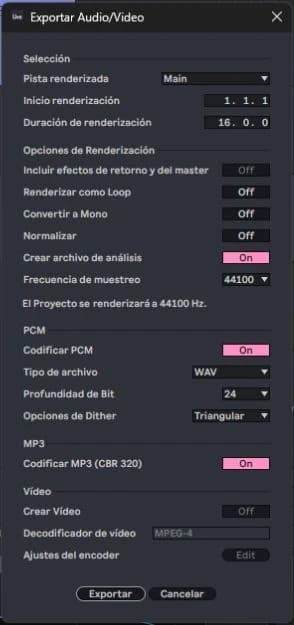
step by step
- Defines the beginning and end of the region. Includes any effects queues that must be heard.
- Open Export Audio/Video and select the appropriate output, usually Main for a stereo mix.
- Choose WAV and the settings requested by who will receive the file. For a work mix, 24-bit is usually a practical choice; avoid unnecessary conversions.
- Review normalization and dither according to your delivery flow. Do not activate options without understanding their function.
- Export and listen to the entire file from another player.
Guided practice
Export a short version and check the beginning, end, balance and absence of unexpected silences. Give it a version name to distinguish it from the next revision.
Take it to your next session
An Ableton project is useful when you can finish and review a version of your own. Work on a copy of a compatible project and export your changes to compare them with the starting point.
Defines what the file will be used for
A listening reference, a handover to someone else, and a final master's degree may require different options. Agree on format, sample rate and bit depth when there is a recipient. Don't make a common setting a universal rule for any export.
Listen to the beginning and end of the resulting file and confirm that it contains the version you wanted to deliver. Tailed effects can extend beyond the last clip. Use names that identify theme and version; A good export loses its usefulness if you later cannot distinguish it from a previous mix.
If it doesn't turn out as you expected
If a track is missing, check mute, solo, region and selected output. A stronger export does not guarantee a better mix. Do not change the sampling frequency for a supposed automatic quality improvement.
PUT THE WORKFLOW TO USE
View Ableton projects
An Ableton project is useful when you can finish and review a version of your own. Work on a copy of a compatible project and export your changes to compare them with the starting point.QUICK ANSWERS
Frequently asked questions
KEEP BUILDING
Related production guides
How to prepare a final listen of your project in Ableton
Before finishing a version, listen to the entire project without dwelling on every detail. This pass allows us to recognize problems of structure, entrances and endings that a short loop does not reveal. In Ableton, separate listening from editing so you don't lose the big picture.
How to export aligned stems from Ableton
Stems are groups of audio prepared for another stage of work. In Ableton it is best to agree on what the recipient needs: individual tracks, groups, dry signals or included effects. Exporting everything without that agreement can result in files that are difficult to recombine.

How to create vocal chops with samples in Ableton
A vocal chop converts vocal fragments into rhythmic or melodic material. In Ableton you can do it with Simpler and MIDI. Creativity does not eliminate the need to have rights to the original recording.