How to export aligned stems from Ableton
Stems are groups of audio prepared for another stage of work. In Ableton it is best to agree on what the recipient needs: individual tracks, groups, dry signals or included effects. Exporting everything without that agreement can result in files that are difficult to recombine.
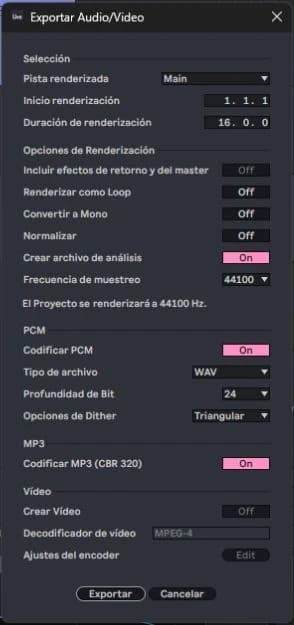
step by step
- Defines the same start and duration for all files.
- Decide which pools you will deliver and how you will handle returns, sidechain, and main output processing.
- Use the appropriate export track selection and review the options that affect Return and Main effects.
- Import the results into an empty Set, aligned to the same beginning, and compare them with a reference mix.
Guided practice
Export drums, bass and musical elements as exercise. Reimport them at the same time and listen to see if they match in time. If the sum differs from the mix, investigate shared processing before repeating the export.
Take it to your next session
When studying Ableton projects, practicing deliveries helps you understand their routing. Keep the original samples and devices in your working copy and only share material that you can distribute.
Alignment Matters Even if a Track Starts Quiet
Exports all parts from the same reference point and preserves the necessary initial rests. That decision allows whoever receives the files to put them together without reconstructing their position. Don't trim each stem down to the first sound if you need to keep the project in sync.
Clarifies what the files include: track processing, returns, or dry versions. The sum may behave differently if shared processing is involved. Attach a reference mix to communicate the goal and use clear names, especially if you are delivering multiple versions of the same instrument or group.
If it doesn't turn out as you expected
A bus compressor or limiter may respond differently when the parts are processed separately. Avoid promising that any set of stems will add up to the master. Includes a mix of reference and delivery notes.
PUT THE WORKFLOW TO USE
View Ableton projects
When studying Ableton projects, practicing deliveries helps you understand their routing. Keep the original samples and devices in your working copy and only share material that you can distribute.QUICK ANSWERS
Frequently asked questions
KEEP BUILDING
Related production guides
How to prepare a final listen of your project in Ableton
Before finishing a version, listen to the entire project without dwelling on every detail. This pass allows us to recognize problems of structure, entrances and endings that a short loop does not reveal. In Ableton, separate listening from editing so you don't lose the big picture.
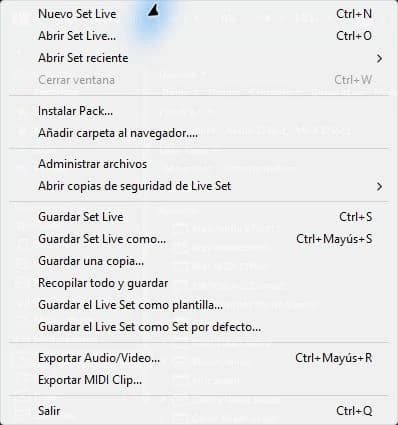
How to choose samples compatible with your project in Ableton
Choosing samples for an Ableton project is solving a musical need. More files do not guarantee a better idea. Before purchasing another library, identify if you are missing attack, movement, texture or a base to build on.
How to export your Ableton project to WAV
Exporting an Ableton project to WAV creates an audio file of a chosen region and output. Before exporting, confirm which version you want to deliver and what it will be used for. A mix to continue working does not need the same adjustments as a specific final delivery.