Collect All and Save in Ableton: save project samples
Collect All and Save collects referenced files in the Ableton project folder. It is useful for moving a session, but does not automatically package all possible licenses, plugins, or external dependencies.
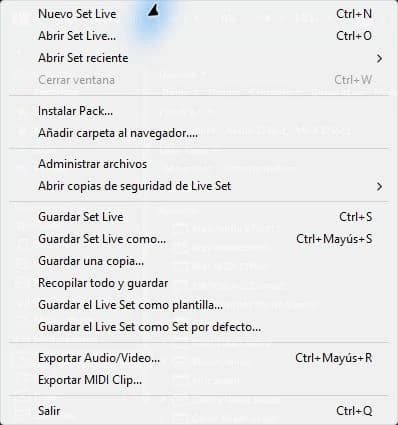
step by step
- Save the Set in its own project folder.
- Open the File menu and select Collect All and Save.
- Review the categories of files offered to collect and select the ones necessary for the transfer.
- When finished, check the project folder and reopen a copy to check for missing media.
Guided practice
Use a sample from a test folder and save it to a new Set. After compiling, check that the project retains your copy. Do not delete or disconnect your only original source to check.
Take it to your next session
When working with Technopirata projects and libraries, keep licenses and requirements with your notes. Use the compilation to organize your work, respecting the conditions of the purchased material.
Compilation protects the work you've actually used
Think of this function as a way to gather Set dependencies, not as a backup of your entire library. Samples that are not part of the project still need their own organization and support. Keep both needs separate so you don't rely on incomplete protection.
Before submitting the project, review the resulting portfolio and its requirements. External devices may still require installation and licensing even if the audio is gathered. Add an exported reference so the other person can hear the intended result while you prepare your Ableton environment.
If it doesn't turn out as you expected
This operation does not grant you permission to redistribute samples. It also does not install the project's VSTs on another computer. If a device uses its own external library, check its moving instructions.
PUT THE WORKFLOW TO USE
View Ableton projects
When working with Technopirata projects and libraries, keep licenses and requirements with your notes. Use the compilation to organize your work, respecting the conditions of the purchased material.QUICK ANSWERS
Frequently asked questions
KEEP BUILDING
Related production guides

How to freeze tracks to reduce load in Ableton
Freezing a track in Ableton can reduce the processing needed to play instruments and effects. It's a handy tool when a session starts to consume too many resources, but it's a good idea to keep an editable version.
How to open an Ableton project without losing its samples
Opening an Ableton project correctly starts before double-clicking: you need the full folder, a compatible version of Live, and the required devices. The ALS file alone may not contain the project samples.
How to add your samples folder to the Ableton browser
Adding a samples folder to Ableton's browser creates convenient access to your files; it doesn't make that folder part of every project. Use a stable location and preserve the original organization of the library to avoid broken references.