Where to Download Ableton Templates for Techno and House: Complete Live Projects
Download an Ableton template only after confirming the Live version, required plug-ins, included samples, license and whether the archive opens as a complete Project. A strong template exposes arrangement, routing, automation and mix decisions you can inspect. TechnoPirata's real project catalogue is the direct place to evaluate the Ableton sessions currently offered by this site.
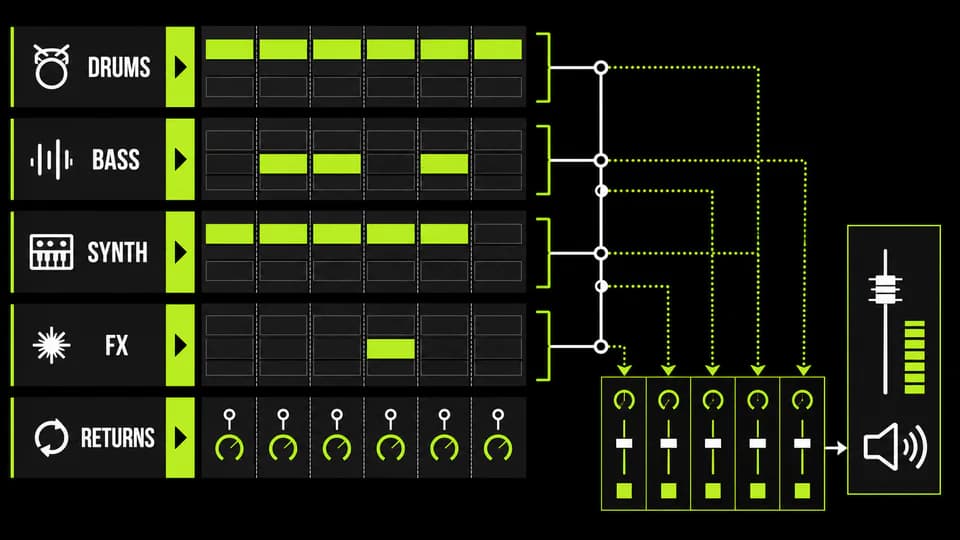
Choose a complete Ableton project that will open correctly
The best place to download Ableton templates is a producer store or project library that names the exact Live version, lists external devices, states whether samples are included and provides a license before payment. A thumbnail of Arrangement View is not enough. Confirm the delivered archive, operating-system limitations if any, approximate project requirements and a support route. TechnoPirata links only to the project catalogue that actually exists on this site.
An .als file is an Ableton Live Set: it stores tracks, clips, device states, automation and references to media. It is not automatically a self-contained archive. The surrounding Project folder may hold recorded, processed and collected samples, presets and backup Sets. A seller should distinguish a single .als file from a complete Project prepared with Collect All and Save. Plug-in binaries cannot be packed into the Project and must be installed separately.
A template and a full production project overlap but are not identical. A reusable template normally provides neutral routing, groups, return tracks, monitoring and starting devices. A complete project demonstrates a particular arrangement with musical clips and automation. Some downloads combine both ideas. Decide whether you need a repeatable studio setup, an educational song breakdown or source material to transform; otherwise you may buy complexity that does not answer your current question.
Free Ableton templates can be useful when the author and terms are clear. Premium files may offer deeper documentation, collected media or a more developed arrangement, but price does not guarantee compatibility. Never use a misleading free-download button to reach a paid product. For either type, inspect the minimum Live edition and version, third-party plug-ins, Max for Live requirements, included packs, sample licenses and whether a rendered reference is supplied.
Live 11 Sets generally open in Live 12 because newer releases are designed to read earlier Sets, but saving from a newer version can prevent reopening in the older one. Devices and features also depend on edition and installed Packs. Treat the creator's stated minimum version as the contract and save a new copy after opening. Do not overwrite the supplied source; an untouched original is the fastest route back when an experiment breaks routing or automation.
Stock-plug-in templates reduce external dependencies, but stock does not necessarily mean every Live edition includes every device. Standard, Suite and Intro have different feature sets, and Max for Live content may add another requirement. A third-party VST is not inherently a problem when it is named precisely and you already own a compatible version. The warning sign is an undisclosed chain whose missing processors change the core sound or routing.
| Check | Confirm | Why it matters |
|---|---|---|
| Live version | Exact minimum version and edition | Sets and devices must load |
| Archive | .als plus the intended Project folders | Media references need context |
| Plug-ins | Names, formats and versions | Missing devices can change the sound |
| Samples | Included, collected and licensed | An .als alone may reference absent files |
| License | Learning, derivative work and release terms | Project ownership is not automatically transferred |
| Support | A real contact or documentation path | Compatibility questions need evidence |
Inspect routing, automation, mixing and missing dependencies
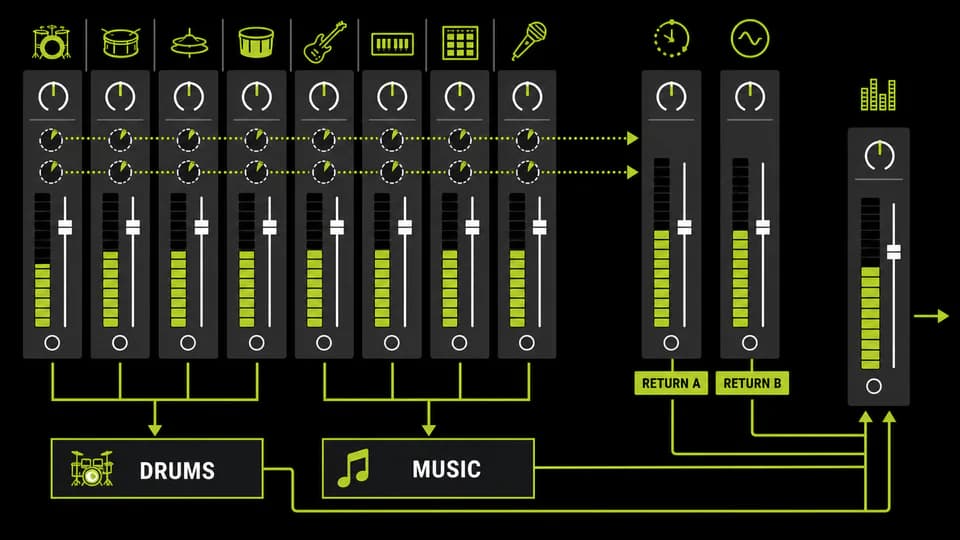
Open a downloaded template from a copied Project folder, not directly from the ZIP. Read any documentation first, launch the stated Live version and let the Set finish loading before changing devices. Save As into a new Project with your own neutral name. Then use Manage Files to view referenced media. If everything is present, make an initial playback at low level and compare it with any supplied reference render before diagnosing creative choices.
When a plug-in is missing, Live normally preserves the device placeholder and reports the unavailable component. Identify its role before substituting it. A missing EQ may be replaced by a transparent native EQ after matching broad moves; a synthesizer requires rebuilding the patch or choosing a new source; a specialist dynamics or distortion processor may change gain staging. Do not insert a random VST simply because its category name is similar.
Study routing from the bottom up. Trace individual drum channels into their group, identify sidechain sources, inspect return sends and confirm where parallel or master processing begins. Disable devices one at a time at matched loudness. This reveals whether punch comes from sound selection, clip envelopes, bus saturation or limiting. Copying a chain without understanding its input level is unreliable because processors respond to the signal they receive.
Automation tells you how the loop becomes an arrangement. Inspect filter cutoff, send levels, mutes, device activators, clip envelopes and macro movements across 8-, 16- and 32-bar phrases. Return tracks show how shared spaces and transitions are managed. MIDI reveals notes and velocity, while audio clips reveal edits, fades and warping. The educational value is in relationships among these elements, not in one secret preset.
Mixing and mastering chains should be evaluated with headroom. Turn off the final limiter and listen at a matched level before judging the balance. Note group processing, high-pass choices, mono management and the relationship between kick and bass. If the project is stylistically useful but the master is aggressive, keep the arrangement lesson and rebuild the finishing chain. A template is a reference system, not an instruction to preserve every processor.
Samples included with a project remain governed by their license. Collect All and Save makes file references portable; it does not grant permission to redistribute the Project or its isolated media. When replacing sounds, use sources you own and document them. The companion techno-sample download guide covers previews, WAV claims, royalty-free language and Drum Rack organization without duplicating this project-file workflow.
- Extract the archive and preserve one untouched source copy.
- Open with the stated Live version and edition.
- Use Manage Files to audit missing or external media.
- Trace channels, groups, returns and master routing at matched loudness.
- Replace missing devices by function, not by category name alone.
- Save the transformed work as a separate Project.
Turn the template into an original techno or house track
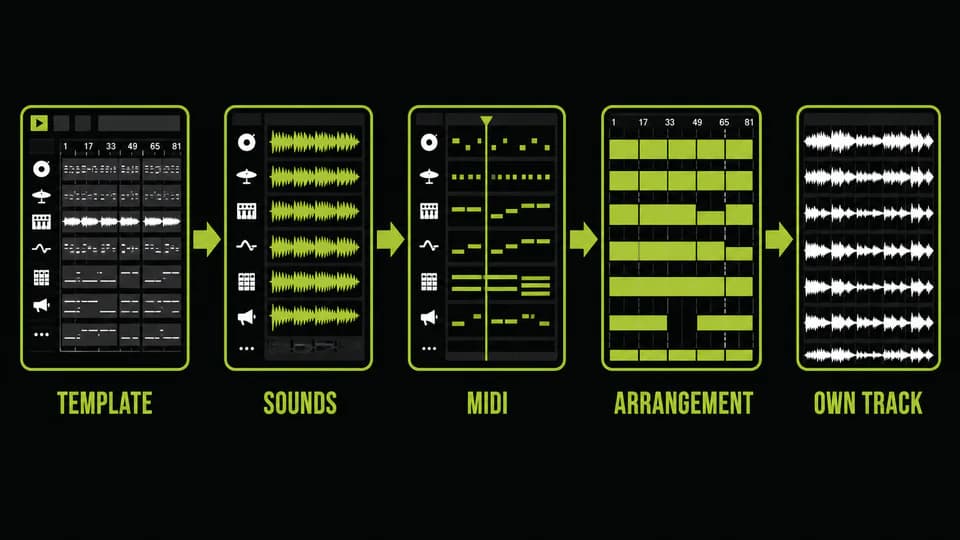
Start transformation with a written diagnosis: identify the groove, sound palette, harmony, arrangement and mix decisions that define the supplied project. Choose which one you want to study and which four you will change. Replacing the kick while leaving identical MIDI, automation, breaks and effects rarely creates an original track. A stronger exercise preserves one structural lesson while rebuilding musical content and production choices around your own reference.
Replace sounds deliberately. Match functional roles before chasing similar timbre: a short kick remains a low-end anchor, a shuffled top loop remains motion, and a noise lift remains transition energy. Then edit MIDI rhythm, pitch, note length and velocity. Resample or reprogram audio loops. Change the key or modal center when harmony exists. These actions force the project's routing to respond to genuinely new material.
Change the arrangement at phrase level. Move the first major entry, redesign the break, alter how often the central motif disappears and write new transitions. Keep DJ utility in mind with readable intro and outro phrases, but do not inherit an exact bar map. Automation should follow the new energy story. Delete lanes that no longer solve a problem; adding movement everywhere is not the same as developing tension.
For Hardgroove, choose a project whose drum grouping and syncopation are visible, then rebuild the percussion conversation. Raw or hypnotic techno benefits from sessions where texture, repetition and automation can be isolated. Acid templates should leave room for a central resonant sequence. House and tech-house projects should reveal groove, bass placement and phrase-based arrangement. Genre labels are filters, not guarantees; inspect the actual session features.
Choose the appropriate template by asking one question: what do I need to learn or accelerate today? If the answer is routing, select a clean stock-device project. If it is arrangement, prioritize readable locators and automation. If it is mixing, require sensible gain staging and references. If it is sound design, confirm editable devices rather than flattened stems. The largest session is not automatically the most useful teaching tool.
Before publishing music derived from a template, remove supplied demos you do not need, verify every sample license, freeze or replace unavailable devices, collect used media and export test versions. Compare against the source only to detect accidental copying, then close it and finish from your own brief. The goal is not to disguise a template; it is to understand a system well enough that the final decisions belong to you.
| Goal | Look for | Change first |
|---|---|---|
| Arrangement | Clear locators, phrase changes and automation | Bar map and transitions |
| Mixing | Transparent routing and conservative gain staging | Source levels and references |
| Sound design | Editable instruments, racks and macros | Patches, MIDI and modulation |
| Hardgroove | Separated drums and visible syncopation | Percussion conversation |
| House | Groove, bass placement and DJ-friendly phrases | Harmony and arrangement identity |
PUT THE WORKFLOW TO USE
Explore Ableton Templates
Open TechnoPirata Projects and verify the sessions currently available.QUICK ANSWERS
Frequently asked questions
Where can I download Ableton templates?
Use a producer store or project library that states the Live version, included media, plug-ins and license. TechnoPirata's Projects page lists the sessions actually available here.
Are there free Ableton templates?
Yes, when a creator deliberately offers one under clear terms. Free describes price, not completeness or permission; verify the archive and license before use.
Where can I download Ableton project files?
Choose a verified project catalogue that provides a complete archive rather than an isolated .als with missing references. Review requirements before downloading.
Do Ableton templates include samples?
Some do and some do not. An .als stores references, so the listing must explicitly state whether audio was collected into the Project.
Do Ableton templates require VST plug-ins?
Only when the creator used third-party devices. Check names, formats and versions; stock-device projects can still require a specific Live edition or Pack.
How do I open an Ableton template?
Extract it to a stable folder, preserve the original, open the .als in the stated Live version, audit missing media and Save As into a new Project.
Can Ableton Live 11 templates open in Live 12?
Live 12 can generally open earlier Sets, but devices depend on edition and installed content. Once saved in a newer version, the Set may not reopen in Live 11.
Can I make my own track from a template?
Yes when the license allows derivative musical work. Replace sounds, rewrite MIDI, change arrangement and automation, and verify all third-party sample permissions.
What is an .als file?
It is an Ableton Live Set containing tracks, clips, devices, automation and references to media. It is not necessarily a complete self-contained Project.
Are Ableton templates useful for learning production?
They are useful when you inspect relationships among arrangement, routing, automation and level choices instead of merely swapping a few sounds.
What happens when a template has missing plug-ins?
Live reports unavailable devices. Identify each device's role, install a licensed compatible version or rebuild that function with tools you own.
Which Ableton template should I choose for techno?
Choose by the problem you need to solve—groove, arrangement, routing, mixing or sound design—and confirm that its version and dependencies match your system.
KEEP BUILDING
Related production guides
Where to Download Techno Samples: Packs, Loops and One-Shots for Ableton Live
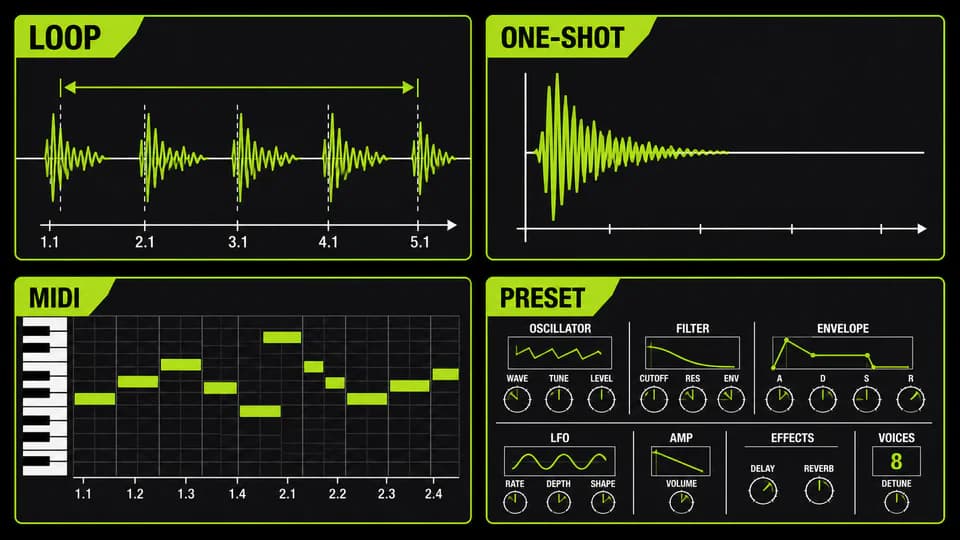
Download techno samples from a source that states the license, file format and exact contents before checkout. A useful pack should let you preview the sound, distinguish loops from one-shots, confirm BPM or key where relevant and understand whether commercial releases are permitted. TechnoPirata's live sample explorer is the safest starting point for material actually available here.
Kick and Bass in Techno: Phase, Space and Groove
Understand the relationship between techno kick and bass by assigning frequency roles, checking phase, shaping envelopes and using sidechain movement that supports the groove instead of flattening it.
Why Ableton Techno Templates Improve Production
Learn how a carefully designed Ableton techno template removes repetitive setup, protects creative focus and turns strong loops into finished arrangements without making every track sound the same.