Ableton Techno Projects: Learn for US$15 and Save
Ableton techno projects show a complete track with MIDI, audio, routing, automation, mixing, and arrangement. TechnoPirata offers projects for US$15 and 30-day Pro access for US$35. See how much you save, what you can learn, and which option fits the number of sessions you plan to study.
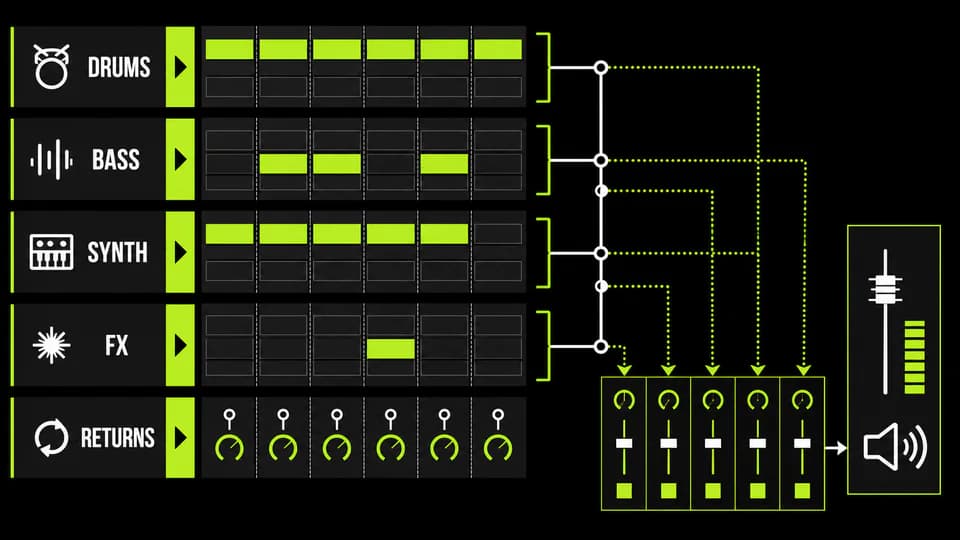
What a complete project teaches
A complete session shows MIDI, audio, routing, automation, mixing, and arrangement. Hear the full track first, then inspect how kick, rumble, percussion, and textures work together.
How much TechnoPirata saves
One project costs US$15 versus a typical US$29: about US$14 or 48% saved. Six typical projects would cost about US$174. Pro at US$35 can save roughly US$139 when you study all six.
Individual project or Pro access
Buy one US$15 project for a specific question. Choose Pro at US$35 when you will study at least three sessions in 30 days; three individual purchases already total US$45.
Check compatibility
Current projects use Ableton Live 12.4.3. Check edition, Max for Live, plug-ins, and samples. The official Live trial runs for 30 days with saving and exporting enabled.
Study without copying
Study functions and rebuild the method with your sounds. Use an empty Set to reproduce kick-bass interaction, automation, returns, and energy without copying the track.
Common buying mistakes
Do not buy before checking the version, work from a copy, and do not expect a template to finish your music. Savings matter when you apply the lesson.
Final selection checklist
Confirm goal, version, plug-ins, files, license, and time. Choose US$15 for one need or Pro for several sessions, then complete an original exercise.
PUT THE WORKFLOW TO USE
Choose an Ableton techno project
Compare six sessions and start with the one that solves your next goal.QUICK ANSWERS
Frequently asked questions
How much is one project?
US$15 per project.
How much do I save?
About US$14 or 48% versus a typical US$29 project.
When is Pro better?
When studying three or more projects in 30 days.
Is Ableton Live included?
No; you need compatible Live or the official trial.
Which version do I need?
Current projects list Live 12.4.3.
KEEP BUILDING
Related production guides
How to Produce in Ableton Live: Essential Techno Workflow
To produce in Ableton Live efficiently, set up a clean project, use Session View to test clips, move to Arrangement View early and organise drums, instruments, returns and automation by role. This guide gives you a focused techno workflow for Audio, MIDI, Drum Rack, Simpler, templates and test exports while showing which Live features can wait.
How to Make a Techno Rumble in Ableton Live
To make a techno rumble in Ableton Live, send a clean kick to a short reverb, record the wet tail, shape its envelope and spectrum, then duck it from the dry kick. The useful result is a controlled low-end rhythm that supports each impact; it is not simply a loud reverb or a second kick hidden underneath the track.
Where to Download Ableton Templates for Techno and House: Complete Live Projects
Download an Ableton template only after confirming the Live version, required plug-ins, included samples, license and whether the archive opens as a complete Project. A strong template exposes arrangement, routing, automation and mix decisions you can inspect. TechnoPirata's real project catalogue is the direct place to evaluate the Ableton sessions currently offered by this site.